
Billing and Accounts
How to Manage Your Billing and Subscription
Your free trial gives you access to set up your profile, scan for funding matches, and draft an application to see the tool in action. To unlock the full list of matches and manage your subscriptions, you will be prompted to subscribe to a paid account.
This guide explains our subscription model, the upgrade process, your payment options, and how to manage your subscription.
Key Subscription and Pricing Details
Here are the key details about how Fundsorter's subscriptions work.
- Pricing Model: Pricing is per organisation per calendar month, not per user.
- User Access: You can have up to five users in your account.
- Full Access: All subscriptions receive access to the full Fundsorter product suite.
- Currency & Tax: All prices are in New Zealand dollars (NZD) and exclude GST.
- Subscription Terms: Organisations choosing to pay by credit card can sign up for monthly subscriptions. Organisations choosing to pay by invoice can sign up for monthly, quarterly, or annual subscriptions. For either payment type, a monthly subscription is the minimum term.
- Payment: Subscriptions are payable in advance and are recurring until cancelled.
- Cancellation & Refunds: To provide flexibility, we offer monthly, quarterly, and annual terms. Please note that subscriptions are non-refundable, and no refunds or credits are offered for partially used subscription periods or for early cancellation. If you cancel, your subscription will remain active until the end of your current paid term (e.g., at the end of the month, quarter, or year).
- Fair Use: A fair use policy applies. Please refer to our Terms & Conditions for further details.
Understanding Your Pricing Tier
Fundsorter's pricing is tiered based on your organisation's annual expenditure, as defined by New Zealand Charities Services. Our system will identify your tier using the Charities Number information you provided during sign-up.
For organisations with annual expenditure less than $40,000 per year, we offer a Micro Tier pricing - this can be selected when signing up to a paid account.
- Micro Tier: Expenditure of $40,000 p/a or less
- Tier 4: Expenditure of $40,000 to $140,000 p/a
- Tier 3: Expenditure of $140,000 to $5,000,000 p/a
- Tiers 1 & 2: Expenditure of $5m p/a or more
We recommend you check that your tier is correct. If it's not, please email us at accounts@fundsorter.com.
A note for Tier 1 & 2 Organisations: We know there are some larger organisations that don’t source much income from grant funding, and some smaller organisations that do. Our goal is to understand your specific circumstances so we can find an affordable, reasonable price based on your needs. Please contact us at accounts@fundsorter.com to discuss your organisation's circumstances.
Additional resources about tiers:
- General information on tiers: https://www.charities.govt.nz/reporting-standards/which-tier-will-i-use
- You can confirm your organisation's annual expenditure by searching the Charities Register: https://register.charities.govt.nz/CharitiesRegister/Search
Payment Options
When you're ready to subscribe to a paid account, click on Manage Organisation in the main navigation, and then the tab called Accounts. You will be presented with two payment options:
- Credit Card
- Pay monthly with your credit card. Your account will be activated immediately after payment.
- Features: Automatic monthly billing, secure payment processing.
- Pay by Invoice
- We'll receive a Fundsorter invoice via email. Your account will be activated when the invoice is issued.
- Features: Monthly, quarterly, or yearly invoicing; 7-day payment terms.
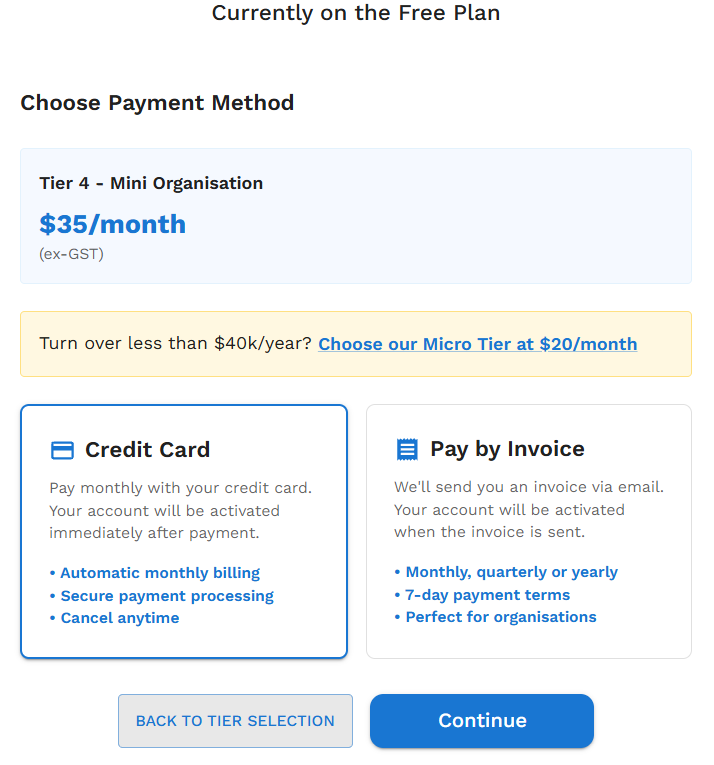
Important: When selecting 'Pay by Invoice', please be sure to select your preferred billing frequency (monthly, quarterly, or annual).
How to Manage Your Subscription
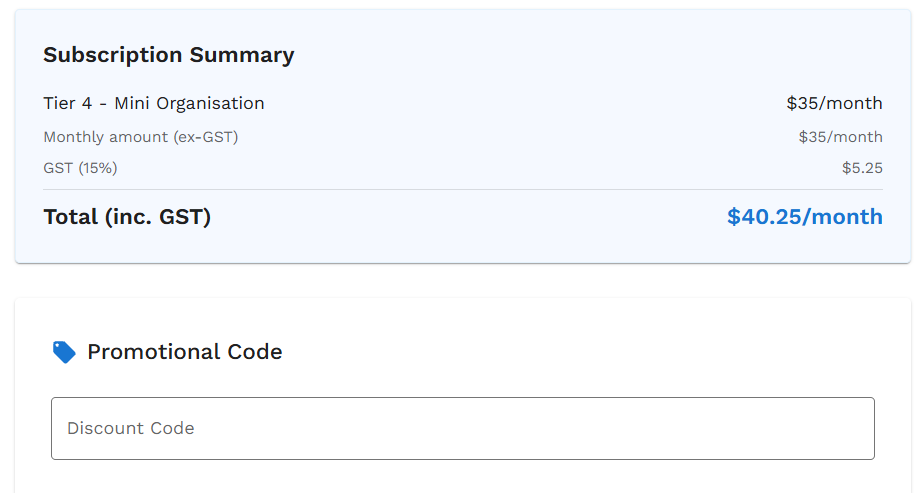
Applying a Discount Code
If you have a discount code, it should be applied during the 'Upgrade to a Paid Plan' process. The discount will be applied automatically. If you have any queries about your discount code, please email accounts@fundsorter.com.
Changing Your Payment Method, Term, or Tier
Click the Manage Organisation button in main navigation, then click the tab called Accounts.
For Organisations on a Free Trial
- To upgrade, choose your preferred payment method outlined here.
- Micro Tier: Organisations with an annual turnover of less than $40,000 can select the Micro Tier option here.
For Organisations on a Paid Account
The Accounts tab provides a complete overview of your subscription:
- Subscription Overview: View your current plan, payment method (Stripe or Invoice), and billing frequency.
- If your organisation's tier is incorrect or has recently changed, click the Change Tier button.
- If you would like to change your billing method from invoice to Stripe, or from Stripe to invoice, click the relevant button and the change will automatically be applied.
- Billing Information: Click to edit your Legal Name, Billing Email, Contact Name, Phone, Tax Registration Number, and Address.
- Cancel Subscription: You can cancel your subscription at any time using the option provided here.
- Payment History: You can view and download past invoices in the Payment History section. Use the filters to sort by billing method or date range.
How to Cancel Your Subscription
You can cancel your subscription at any time.
- Click Manage Organisation button in main navigation, then click the tab called Accounts.
- Click the Cancel Subscription button and follow the prompts.
Cancellations take effect at the conclusion of the term you have paid for (monthly, quarterly, or annual). There are no refunds or credits for partially used subscription periods.